I have made it a practice to post about topics/projects that are regarding Cyber Security, Linux, Networking and IT Devops, as I find it very helpful with refining my knowledge, and also it provides others with my ideas and innovations. Leaving that aside in the past I used medium.com as the platform in which I post my projects and experiences in the field. But recently I noticed that for my posts to be viewed a subscription is required. That’s when I got the idea to host my own blog, having oracle free tier server unused which I got for my BSC’s dissertation, why not make use of it.
Advantages of this setup:
- A free no cost blog experience.
- An easy Accessible, no paywall, no ad experience for the readers.
- A more advanced method of displaying my Career and Experience.
- Easy format and process for posts especially because the translation of markdown files
- Lightweight and good performance thanks to hugo
Environment / Stack / Tools Used:
- Hugo - Open Source static site generator main tool which helped in creating this blog using papermod theme
- Ubuntu Server
- nginx - web server tool used to expose my blog
- Cloudflare - To make a secure tunnel with my domain
- Oracle free tier
- Docker - To run nginx and hugo in a more isolated and secure environment.
Architecture Overview/How it works:
- Hugo running on docker generates an environment for the site assets which is organized in a manner in which posts and assets such as images can be stored. Posts are written in markdown in their own specific directories with images related to the post stored in the directory.
- Using nginx(docker) then we expose the web server(hugo directory).
- Cloudflare tunnel creates an outbound encrypted tunnel from the server to Cloudflare and exposes it to the public securely by not exposing server public IP and details.
Key Learnings:
- Hugo
- Working with multiple docker containers and networking
- Cloudflare tunneling
- Hosting static sites with nginx
Steps:
- Ran the docker command to build the environment for hugo
docker run --rm -v <directory desired>:/src hugomods/hugo:exts hugo new site .
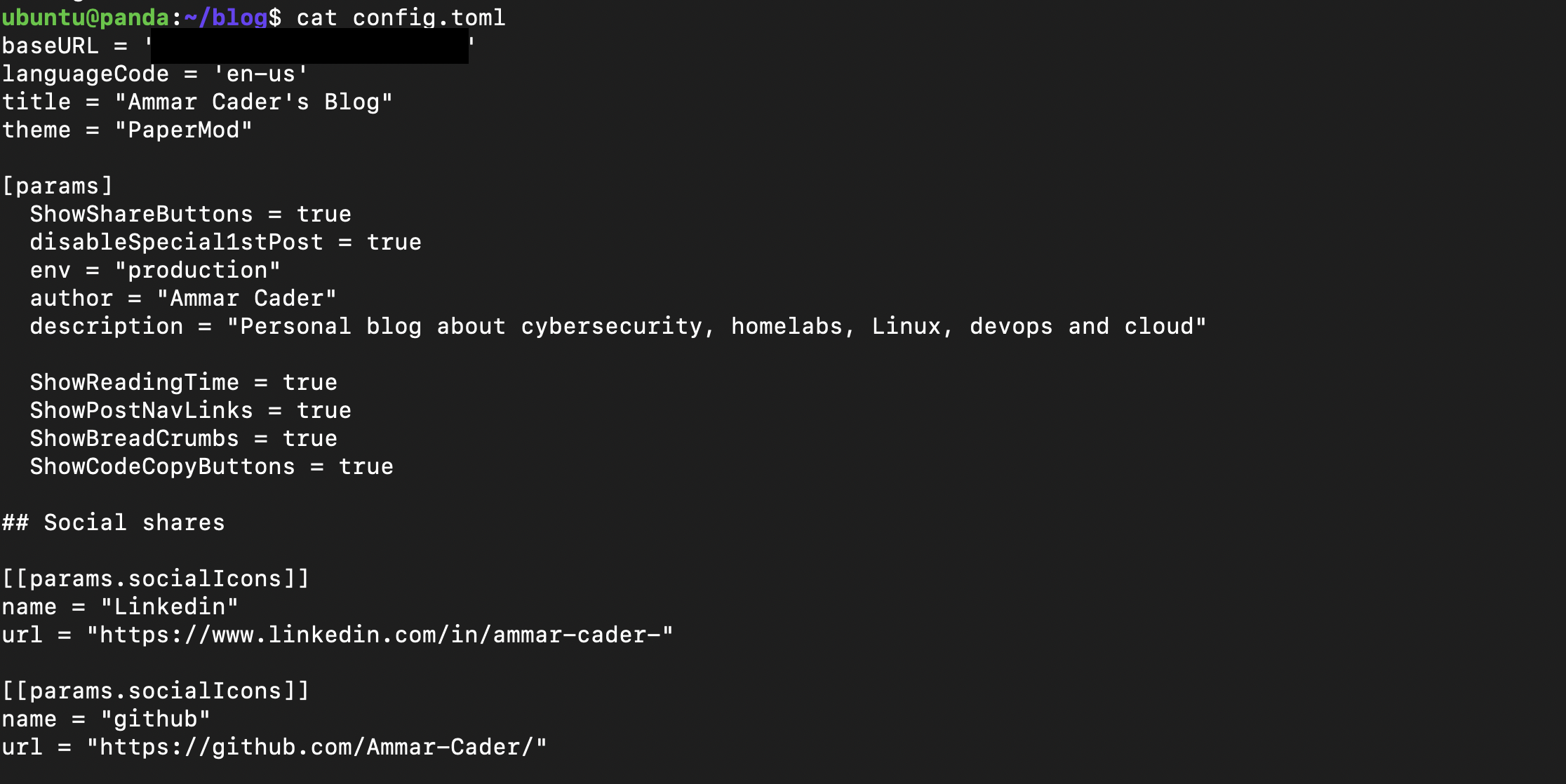
- Added papermod theme to hugo by cloning the repository to “themes” directory within the directory made by hugo environment, also instructed hugo to use papermod by editing “config.toml” file, using the sample file I obtained Sample File for config.toml which is in yaml which can easily be converted to toml using web tools
git init
git submodule add https://github.com/adityatelange/hugo-PaperMod themes/PaperMod
-
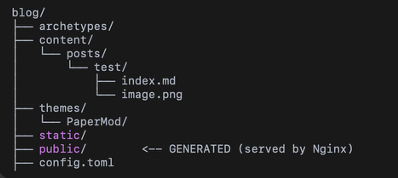
Created a structure for each of my posts in a convenient manner with consideration for image and other file storing
-
Made the homepage more entertaining and selfbriefing rather than just the blogs, Achieved this by creating another markdown file in the “content” directory called “_index.md” with the following contents:
##place it in /<Hugo folder>/content/_index.md
---
title: "Home"
---
<p align="center">
  <img src="/logo.png" alt="Ammar Cader Logo" width="140">
</p>

<h2 align="center">Ammar Cader</h2>

<p align="center">
Cybersecurity • Homelabs • Linux • DevOps • Cloud
</p>

---

Welcome to my personal blog where I write about:

- 🛡 Cybersecurity experiments
- 🧪 Homelab setups
- 🐧 Linux & self-hosting
- ☁️ Cloud & automation

Check out the posts below 👇
- After creating posts with their own directory with the markdown files as well images and other files in their respective project directory, served the static files with nginx
docker run -d \
  --name blog-nginx \
  -p 80:80 \
  -v /home/ubuntu/blog/public:/usr/share/nginx/html:ro \
  nginx:alpine
Security Considerations:
- No Public IP Exposure – Instead of opening inbound ports, I used Cloudflare Tunnel to create an outbound encrypted connection, preventing direct exposure of the server’s public IP.
- Minimal Attack Surface – Only Nginx serves static files. Hugo runs only during build time and is not exposed as a service.
- Read-Only Volume Mount – The Nginx container mounts the /public directory as read-only (:ro) to prevent runtime modification of static files.
- Container Isolation – Services are containerized using Docker to reduce risk and isolate processes from the host system.
- Static Site Architecture – Since the blog is fully static, there is no database, authentication system, or server-side execution, significantly reducing attack vectors.
- Firewall Control – No unnecessary inbound ports are exposed; traffic flows through the secure tunnel.
Key Considerations/Notes:
- After each and every change the hugo command will need to be run to rebuild the static files for changes to take effect
sudo docker run --rm -v ~/blog:/src hugomods/hugo:exts hugo
#Linux #SelfHosting #Hugo #OracleCloud #Docker #Nginx #OpenSource #Homelab #DevOps